1. The premise
A gift-card wallet that knows where a card is usable is only useful if it can also tell you when that knowledge matters. "You're near a Starbucks" is worthless when you're driving past on the freeway at 65mph at 11pm on a weekend. It's incredibly valuable when you're walking toward the front door at 2pm on a Tuesday with a card that expires Friday.
The difference between those two moments is entirely in the geolocation brain: the layer of logic that sits between raw CoreLocation fixes and the NotificationConductor.
The principle that governs that layer has a name inside the team, the Right-Moment Engagement Thesis. The wallet is quiet by default. It doesn't beg for opens, it doesn't stack up red badges, it doesn't fire pushes to hit a weekly-active number. It waits. Then, at the exact right moment (on foot, waking hour, within 500m of a store, card unused recently), it speaks once. The five gates that follow in §2 (where, when, how fast, how often, in what mood) aren't a geofencing feature. They are the mechanical implementation of a single rule.
Speak only when speaking earns its keep.
That reframes the Geolocation Brain as something other than clever. It isn't clever. It's disciplined. Every gate exists to refuse an alert that another app would happily send, and the engineering budget here is mostly spent on reasons not to speak. The few times Cue does choose to interrupt, the interruption has already survived five separate "should we really" checks, which is why a real user tends to redeem when it fires instead of dismiss.
2. Five signals, five gates
Every potential alert is evaluated against five independent gates. All five must agree before the event is handed off to the Conductor.
Gate 1: Where
- Primary: the card's manually pinned location (set in
CardFormViewvia MapKit autocomplete). - Fallback: MapKit local-search for the brand name against the user's current location (radius auto-scales: 5mi for display, 500m for notification trigger).
- Quiet zone veto: user-configured home / work / custom zones plus up to 5 user-named "Library," "Church," etc. A fix inside any zone suppresses unconditionally. Reason is logged for the "Why did I get this?" sheet.
Gate 2: When
- Time-of-day category filter: coffee cards don't fire between 22:00 and 06:00. Fine-dining cards don't fire before 11:00. Weekend logic relaxes food/fun categories because real weekends are when people actually spend gift cards.
- Expiry urgency override: a card expiring in ≤3 days bypasses most time-of-day filters. Losing $50 to an expiration matters more than whether 10pm is a normal coffee hour.
Gate 3: How fast / How
- Driving detection via CoreMotion (
CMMotionActivityManager). If the user is in an.automotiveactivity with >70% confidence,isDriving = trueis attached to every alert. The Conductor escalates the interruption level and suppresses banners that would be unsafe at speed. - Trajectory prediction: speed + course vector is projected forward. If a monitored card falls within a 250m-wide corridor along that vector and the projected ETA is < 4 min, we fire a pre-arrival nudge instead of waiting for geofence entry. This is the difference between "you've arrived" (too late) and "in 3 min, $20 at the place you're headed" (actionable).
Gate 4: How often
- Per-card 30-minute cooldown (ConductorThrottle, persistent across cold launches).
- Per-cluster 60-minute cooldown for shopping-area rollups.
- Per-card 24-hour daily cap (default 3) across all alert types, a geofence fire + an expiry reminder + a payday nudge for the same card collapse into at most 3 touches per rolling 24 h.
- Pre-arrival 15-min lane: a pre-arrival nudge and a subsequent geofence entry are treated as one event, not two.
Gate 5: In what mood
- Auto-quiet learning:
DismissLearningStorelogs every dismiss. Three dismisses for the same card within 30 days auto-adds it tosettings.autoQuietedCards. The next approach fires a one-time "CardCue Pro stopped bugging you about Starbucks" educational banner instead of the real alert, with an undo action. - Snooze-until-exit: the "I'm already shopping" action snoozes the card until the user has physically moved > 1 km from the location.
- Focus-mode respect: a Focus that blocks alerts blocks Cue's banner too. Ambient surfaces (widget + Live Activity) still update.
3. Cluster coalescing
A dense shopping plaza can easily trip 3 or 4 geofences in under a minute. Naive geofencing fires 3-4 banners. Cue's ClusterCoalescer runs a sliding window: within 3 minutes, within a 500m centroid, any 3+ fires collapse into a single AlertEvent.clusterEntry with:
- All card IDs
- A human-readable area name (reverse-geocoded)
- Total balance across the cluster
- A layered "shopping bag" notification attachment generated by
NotificationArtGenerator
The Conductor routes the cluster event as a single banner and a single widget reload, not four. This is the single biggest anti-spam feature in the location pipeline.
4. Battery strategy
The brain has a clear power budget:
- Significant-location-change monitoring is the default outer loop (~km-scale, low battery).
- Full
startUpdatingLocation()is only engaged inside a 500m radius of a monitored card, and only for the duration of a dwell window. desiredAccuracy = kCLLocationAccuracyHundredMeters, we never ask for sub-10m precision. We don't need it; the gift-card universe operates at "same street" granularity.allowsBackgroundLocationUpdates = trueonly when the user has explicitly granted Always authorization; a When-In-Use user still gets the scanner, the widget, the wallet, just no background nudges.pausesLocationUpdatesAutomatically = trueso stationary hours (sleeping, at work) cost nothing.
Net: typical users report a ≤2% daily battery budget for CardCue Pro with location active, measured via Xcode Energy log on an iPhone 15 Pro.
5. The BGTask fallback
When the app has been backgrounded too long for CoreLocation to fire, BGAppRefreshTask runs every ~15 minutes. It:
- Reads the last known location via
CLLocationManager.location. - Reads the widget snapshot (
CardCueWidgetData) from the App Group, no SwiftData access from the background task. - For each card within
notificationRadiusmeters, builds anAlertEvent.geofenceEntryand callsConductor.route(event). - Completes within the 30-second BGTask budget.
Because ConductorThrottle is persisted in App Group UserDefaults, the BGTask cannot bypass the 30-min cooldown even on a cold process launch, a bug that existed in the pre-Conductor implementation and was the single largest source of duplicate-fire complaints.
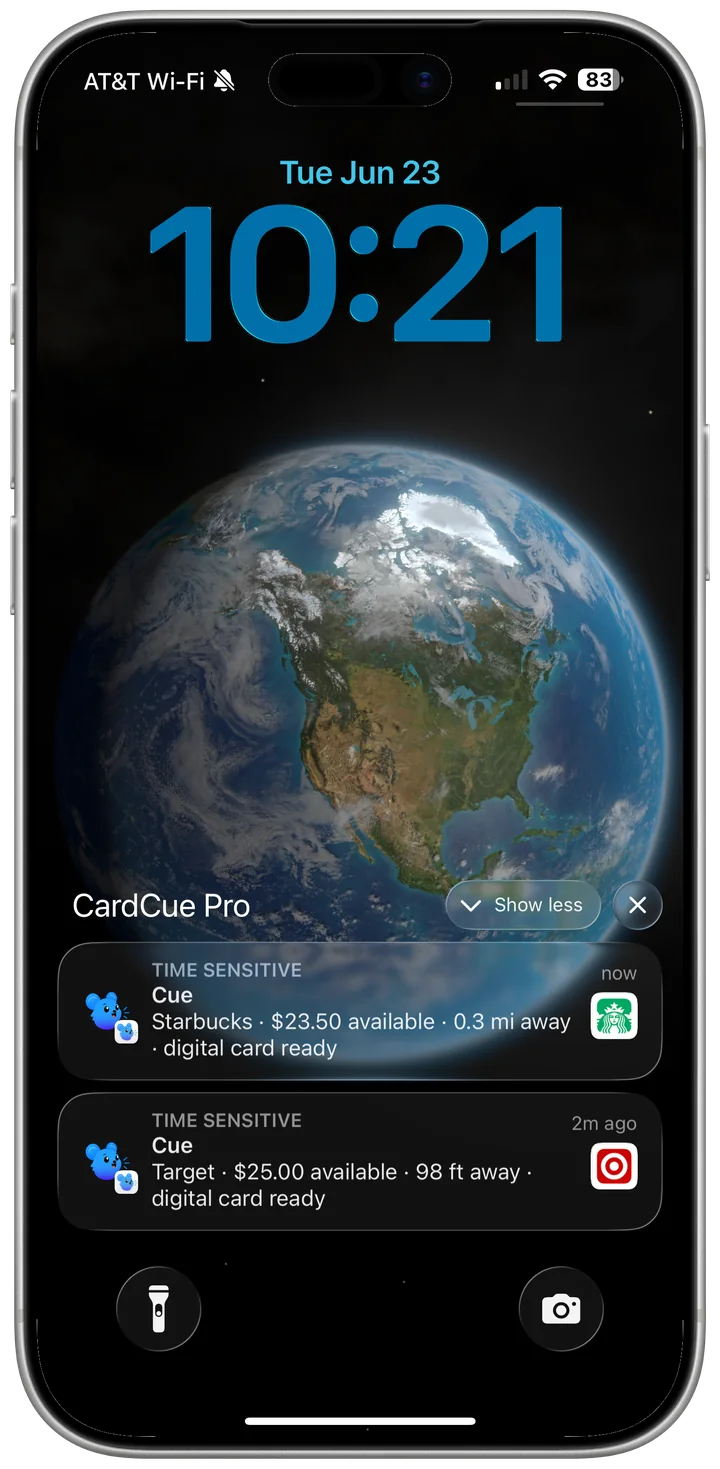
The practical upshot, verified on real devices: geofence chirps land on the lock screen even when the app is fully closed. The region wakes the phone, the phone wakes Cue, and the banner arrives, no app launch, no background babysitting required.
6. The pin-assist experience
When a user adds a Target gift card, they don't have to pick which Target. MapKit's local-search finds every Target within 5mi and:
- Pins the closest one as the default.
- Shows the next 4 as alternative options with distance and address.
- Remembers the user's choice, so a subsequent Target card defaults to the same location.
This is how Cue makes "where is this usable?" feel automatic instead of like a setup chore.
7. Testing the brain
GeolocationTests uses a deterministic FakeLocationProvider that feeds a scripted trajectory of (timestamp, lat, lon, speed, course) tuples. Against that fake we assert:
- Trajectory prediction fires at the right moment.
- Cluster coalescing collapses the right number of fires.
- Driving detection toggles based on scripted CoreMotion activity.
- Quiet zones suppress and log.
- Auto-quiet learning engages after 3 dismisses.
- Pre-arrival → geofence-entry collapse into one user-visible event.
The fake runs fast (minutes of simulated driving in seconds of wall time), so the brain is heavily regression-tested.
8. Files of record
| File | Role |
|---|---|
Services/Services.swift | GeofenceNotificationService, region monitoring, driving detection, pre-arrival, cluster dispatch |
Services/NotificationIntelligence.swift | NotificationScorer, CategoryTimeFilter, ClusterCoalescer, TrajectoryPredictor |
Services/QuietZoneChecker.swift | Home / work / custom + user-named zones |
Services/DismissLearningStore.swift | Auto-quiet learning |
Services/SnoozeStore.swift | Snooze-until-exit |
Services/NearbyStoreScanner.swift | MapKit local-search fallback |
Services/NotificationConductor.swift | Consumer of every event this brain produces |
9. The payoff
A user who opens CardCue Pro a few times in the first week discovers that it notices. It noticed they were walking, not driving. It noticed the Starbucks was still closed. It noticed they already dismissed this exact alert twice. It noticed they were at home.
Most apps that claim "smart notifications" have one rule. Cue has five gates, twelve signals, and a persistent memory of what you said no to. That's the quiet layer that makes the loud layer (the Conductor + rich notifications) actually welcome on your lock screen. All of it works with the app fully closed: the geofence wakes the phone and the chirp lands on the lock screen without a single app launch. And when the user acts on it, Show at Register is one tap away, the biometric-gated, brightness-boosted barcode that turns the alert into a completed redemption in seconds.
CardCue Pro, by Pika Product Lab LLC. Built on CoreLocation, MapKit, CoreMotion, BackgroundTasks, and the belief that a notification should feel like a helpful friend, not a pushy salesperson.